Chat with us if you have any questions!

Instant Chime for Microsoft Teams
Releases:
- v3.1.5322 (April 2, 2026)
UI Hike Covering Release Details:
Instant Chime for Microsoft Teams
Releases:
- v3.1.3811 (January 12, 2026)
Details:
- Various security and package version updates
Instant Chime for Microsoft Teams
Releases:
- v3.1.3028 (June 4, 2025)
- v3.1.3075 (June 23, 2025)
Details:
- Agent Chat Window: Fixed an issue with URL escaping that caused URLs to become malformed
Instant Chime for Microsoft Teams
Releases:
- v3.1.2974 (May 22, 2025)
Details:
- The installer has been updated to connect directly to SQL Server using its native connectivity libraries, eliminating the dependency on Windows ODBC connectors.
- This enhancement addresses compatibility and security issues that arose when using ODBC drivers, especially with newer TLS protocols
Instant Chime for Microsoft Teams
Releases:
- v3.1.2916 (April 24, 2025)
Details:
- Fixed an issue where links containing slashes were malformed when sent to the guest during chat sessions
Instant Chime for Microsoft Teams
Releases:
- v3.1.2534 (November 6, 2024)
Details:
- Additional support for correctly handling Markdown special characters in messages sent from Guests to Agents
Instant Chime for Microsoft Teams
Releases:
- v3.1.2523 (October 24, 2024)
Details:
- Updating the way messages are displayed to Agents to account for backslashes (\) sometimes being treated as escaped characters.
Instant Chime for Microsoft Teams
Releases:
- v3.1.2446 (September 10, 2024)
Details:
- Updating the way Manager Session Details area displays links within the Chat Transcripts as in some cases underscore (_) characters were getting malformed to have backward slashes (\) prefix
Instant Chime for Microsoft Teams
Releases:
- v3.1.2272 (July 3, 2024)
Details:
- Added the option to turn Client Logging ON or OFF to improve browser performance for Agent and Manager users (Screenshot)
- The default setting is OFF, you may need to perform a Ctrl + F5 browser refresh to see this take effect.
- We also recommend closing all of your browser windows before reopening Chime UI for the first time after this update.

Instant Chime for Microsoft Teams
Releases:
- v3.1.2260 (June 25, 2024)
Details:
- Objective: Add additional reports to track when Agents are invited into conversations as well as reports for Agent performance. Many of our customers have a distribution patten where Managers accept chats and then invite Agents into a chat (especially to achieve designated SLAs). These reports should help track and quantify chat sessions that involve invitations sent to Agents.
- Invited Conversations by Agent (Queue Level: Agent Efficiency and Load category) - To help Managers better identify chats that Agents have been invited to and see how many were accepted vs ignored or declined (Screenshot)
- Chats With No Response From Agent >3 Minutes (Queue Level: Text Analytics category) - To help Managers better identify chat sessions where an Agent has not responded to the Guest/end user for over 3 minutes (Screenshot)
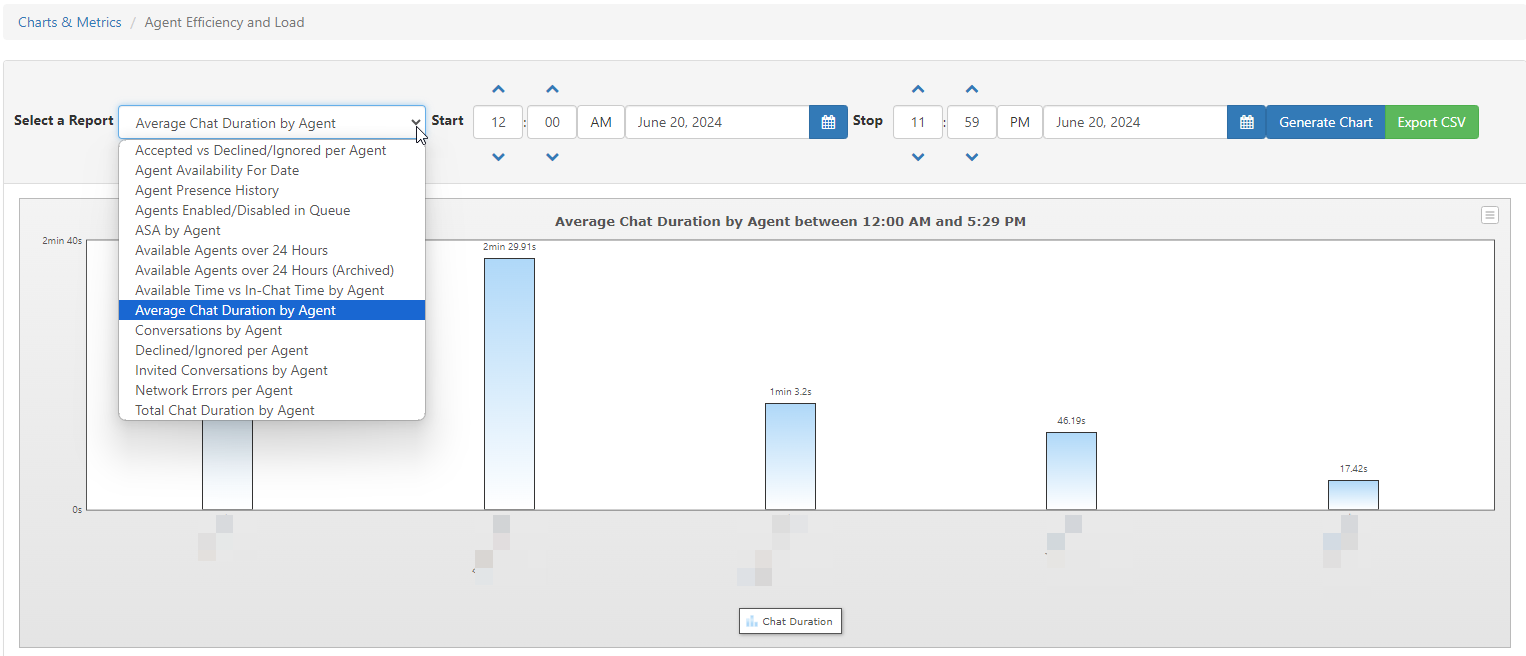
- Average Chat Duration by Agent (Queue Level: Agent Efficiency and Load) - Allow Managers to be able to see the average chat duration of Agents to try and better identify trends (Screenshot)
- Total Chat Duration by Agent (Queue Level: Agent Efficiency and Load) - Provide metrics on the total chat duration of Agents in a Queue for specific time periods (Screenshot)
- Chats With No Response From Agent >3 Minutes (Global System Report) - Global version of the report mentioned above (Screenshot)
- Objective: Provide additional resiliency on Agent network connections especially when Agents are distributed globally and may not be in the same geographic area as the Chime server.
- Added a new setting for Agents to enable SignalR Long Polling. We have observed that on some network connections the default WebSocket setting connects and disconnects more often than is expected. This new option for Agents and Manager to swap to the alternate method of chat notifications to have a more predictable connection. (Screenshot)
- Along with this new setting the Agent dashboard now shows which of the two connection types you are set up for: either WebSocket or Long Polling
- In the Agent Web client you are also able to differentiate if you are set up with WebSocket or Long Polling
- Objective: Provide additional client-side logging and logs for Agents and Managers. These logs may be viewed, download, and searched and provide a lot of additional logging around notifications, network connections, and invitations.
- Added: Client Logs link in Agent and Manager footer (Screenshot)




Instant Chime for Microsoft Teams
Releases:
- v3.1.2200 (May 24, 2024)
Details:
- Adding in additional dispatcher checking to the health check included in the Chime Health Monitoring. If a dispatcher has any issues, Chime health monitor will email administrators that there are issues with a dispatcher (Screenshot)
- Adding in additional information on Dispatcher editor to let admins know that Queues need to be restarted if a dispatcher is updated (Screenshot)


Instant Chime for Microsoft Teams
Releases:
- v3.1.2157 (May 3, 2024)
Details:
- Added new optional feature "Automatically accept chat invites from other agents and managers". This can be found in the Queue Settings > Routing area (Screenshot)
- Note: When this feature is enabled, Agents will automatically get added into chat sessions they are invited to. The Agent also has the ability to open the chat session using the web client if they are on the Agent Dashboard. There will be a notification for them to connect to the chat, but they will also have the option to Pick the chat from the Monitoring Panel. (Screenshot)
- Updated the 'agent acceptance' sequence to reduce load time and streamline parameters that may, or may not, be required as part of the language translation feature.


Instant Chime for Microsoft Teams
Releases:
- v3.1.2000 (January 25, 2024)
Details:
- Added new optional feature to Presence Polling so you are now able to choose your Presence Polling Mode as either "Application" or "Delegated User". Note: Chime will require some additional Azure permissions set up for the Application mode to function.
- Added a new Setting in Admin > Settings > Advanced "Presence Polling Mode" (Screenshot)
- Updated Health Monitor presence area to differentiate between which presence mode you are using (Screenshot)
- We have put together a step-by-step walkthrough on setting up this feature in this guide: Chime for Teams Application Presence Polling Guide
- This feature is recommended primarily for environments that are experiencing some presence outages with the current delegated user presence settings that are in place. If the existing presence settings are working for you, there is no additional benefit to changing the setting.


Instant Chime for Microsoft Teams
Releases:
- v3.1.1953 (November 9, 2023)
Details:
- Improvements for the Agent Web Client accept sequence to reduce the time from clicking accept to getting into the chat session. In doing so, we were able to reduce the accept time by 1 second or more. In the chat accept sequence we saw that the Graph API call for user info was causing some additional time delay for Agents and could pre-populate the user info needed rather than performing Graph API calls on all chat accepts.
- Updated the way Chime calculates table counts in the Health Monitor area to help prevent any cases where polling could cause a DTU spike on SQL servers. This is typically only seen in Chime instances that have more than 1 million lifetime chat sessions.
Instant Chime for Microsoft Teams
Releases:
- v3.1.1946 (October 24, 2023)
Details:
- To help our customers understand how broadly Chime has been adopted across their internal employee community, we have added a new report to track new user adoption. Charts & Metrics / Text Analytics / New Guest Users Since Date (3 Screenshots)
- This report is designed to provide the following info:
- How many employees have accessed the Chime service (engaged with a chat)
- The date and time of that first access
- This should help track metrics on initial usage as well as adoption across the user base (employees). This report is available via the reporting module and available via the reporting API.
- For additional documentation on using this new report with the Chime Reporting API, we have made an FAQ blogpost available: Chime V4 Reporting API FAQ

Instant Chime for Microsoft Teams
Releases:
- v3.1.1936 (October 16, 2023)
Details:
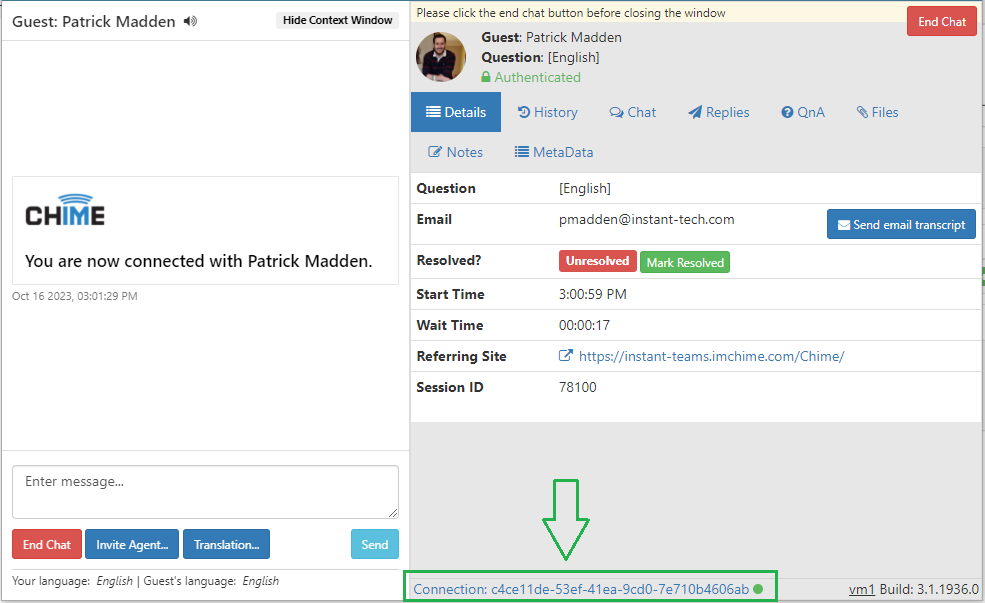
- Include some additional client side logging for the agent UI - specifically to track all of the SIgnalR events, messages, and connections. This UI is available as part of the SignalR status UI on the agent web client (after a conversational has been connected) (2 Screenshots)
Instant Chime for Microsoft Teams
Releases:
- v3.1.1933 (October 11, 2023)
Details:
- Updated client side localization and language cache to minimize network traffic for agent UI accepting inbound chat requests
Instant Chime for Microsoft Teams
Releases:
- v3.1.1911 (September 25, 2023)
Details:
- Remove the cache-control header applied to these image requests so that the browser can cache them (so enable a client side cache of high traffic images). Set a default Last-Modified time for our shipped default images, so that browsers can know whether they should cache images related to the agent’s picture and queue image. The client-side cache has been enabled in order to reduce HTTP traffic responsible for rendering relatively static images.
- Update the admin\advanced setting to log the HTTP request and response into the middleware, so the feature can turn it on and off without having to restart the service. This does not alter all HTTP logging areas - instead, it generally covers the low level OWIN middleware. By default, we recommend that this is turned off unless requested the support team (Screenshot)
- Several optimizations to address potential performance issues identified related to tracking agent presence and status – generally called from several manager dashboards.
- Place in a timestamp limit on this query for getting available agents. The dashboards will now scope this information at one week
- Update the check in this SendEndOfConversation() method to try to avoid raising errors when the connection is a Teams channel connection but the channelId is not set
- Put a date filter on this query to find a session record by sessionGuid. This was an expensive query but it isn't one that gets hit very often – however, an open ended query could be supplied that could result in all a query that might look at all sessionIDs. For large deployments, with more than 500,000 sessions, this could introduce a long running query and impact server performance

Instant Chime for Microsoft Teams
Releases:
- v3.1.1903 (September 12, 2023)
Details:
- Symptom: Web chat conversations to the Chime server do not receive a reply. The MS Teams chat channels operates normally.
- Update: Compensate for change to underlying Microsoft Azure Bot Framework message structure and change to the endorsements applied to message payload. Change appears to be rolling out across Bot Framework service and impacts web chat channel.
Instant Chime for Microsoft Teams
Releases:
- v3.1.1880 (August 16, 2023)
Details:
- Updated virtual agent interface bridge to support fully qualified file name for images
- Updates to OWIN logging settings to improve efficiency of reviewing log files
Instant Chime for Microsoft Teams
Releases:
- v3.1.1835 (July 24, 2023)
Details:
- Update Chime home page greeting UI so that it renders guest’s first and last name. (Screenshot)

Instant Chime for Microsoft Teams
Releases:
- v3.1.1833 (July 20, 2023)
Details:
- Update the web client settings (Admin\Web Client) to include native support for Microsoft Office 365 authentication. Previously, this was primarily authenticating against Windows and local AD domain authentication. If enabled, starting a web chat conversation will require 0365 authentication. (Screenshot)
- Added support for new option in Admin\Settings\Advanced to provide a server level global setting that will hide the ‘pick chat’ button from agents. This is a global setting at the server level. Adjusting this setting does not require a server restart – and it will impact all queues and agents in the system. Managers will still see this ‘pick chat’ option. (Screenshot)
- Update the queue home page and optionally hide the UI for ‘Search Frequently Asked Questions’ if Azure QnA is not enabled (Screenshot)
- Update the agent web chat UI to support attaching multiple files to a chat conversation – and sending across multiple files, and images, to guests after the agent is connected to the chat session (Screenshot)


Instant Chime for Microsoft Teams
Releases:
- v3.1.1806 (July 11, 2023)
Details:
- Updated: Updates related to Office 365 cookie management in order to help resolve sporadic, and in some cases rather consistent, issues with Chime dashboard logins via 0365 authentication service. This issue was impacting both agents, and managers, and in some cases occurred launching a Chime URL from within the Microsoft Teams client.
- Symptoms of this issue are:
- Authentication loopback trying to sign-in and Microsoft authentication form indicating ‘We couldn’t sign you in. Please try again.’
- Authentication issue: see message related to ‘too many redirects’.
- Authentication issue: Microsoft login dialog form continues to ask person to ‘pick an account’ and does not authenticate.
Instant Chime for Microsoft Teams
Releases:
- v3.1.1467 (December 28, 2022)
Details:
- Added a fix to prompt the chat state to change to Post Connected without user input after timeout (ticket #3131)
Instant Chime for Microsoft Teams
Releases:
- v3.1.1455 (December 13, 2022)
Details:
- Added 3 additional custom reports to assist with collecting results of custom metadata fields collected in prechat forms (CountrySelect, EnquiryBranchCode, EnquiryCategory, EnquiryOrderNum, EnquiryPartNum, EnquiryTypeSelect)
- Chat Sessions with Enquiry Details (Screenshot)
- Chats by Enquiry Category (Screenshot)
- Chats by Enquiry Category & Type (Screenshot)


Instant Chime for Microsoft Teams
Releases:
- v3.1.1315 (September 22, 2022)
Details:
- Updated how the numbering displays on Interviews using radio buttons (Screenshot)

Instant Chime for Microsoft Teams
Releases:
- v3.1.1283 (September 9, 2022)
Details:
- #2947 Updates to alleviate Teams API 429 responses & collect seeker locale for webclient
- #2949 Updated ExpertCWEUrl system variable to work better in the ExpertConnected Text Resource
- #2919 Added a "Drop chat" option as an interview timeout action which uses a new Text Resource "Guest Dropped Because of Interview Timeout" (4 Screenshots)
- Added new options to Interview timeout to allow customers to specify the state that should be set for that session
- #2893 Added a Text Resource response if an agent tries to pick a chat that cannot be picked from the Broadcast channel in Teams (2 Screenshots)
- #2951 Modify the GetSessionFiles api to be able to use a sessionId instead of a SessionGUID


Instant Chime for Microsoft Teams
Releases:
- v3.1.1069 (July 6, 2022)
Details:
- Updated installer with new code-signing certificate
- Removed dot from interview options list (2 Screenshots)
- Ensure that seekerData["sessionGuid"] is populated for chats that come in directly from Teams
- Updated code signing certificate for agent notification desktop app so the build will complete

Instant Chime for Microsoft Teams
Releases:
- v3.1.1028 (May 18, 2022)
Details:
- Support for AdaptiveCards 1.3 standard in Teams and Web clients is generally available.
- Enables client-side validation for input elements on AdaptiveCard Queue Text Resources (Input fields > isRequired)
- Example of client-side validation in the Teams Client (4 Screenshots)
- Example of client-side validation in the Chime Web Client (4 Screenshots)
- Input fields have added support for the new label property for more accessibility options and improved placeholder text
- Input fields allow for the regex property so you can set a required format for info submitted
- Input fields now has the errorMessage property which allows you to customize the message displayed when an invalid input is submitted
- Text Runs (specific formatted text) now has the underline property added to it which allows underlined text to be used in cards
- Action.Submit (submit buttons) now have the associatedInputs which can be used to better differentiate submit buttons and cancel buttons
- Required input elements in the "Initial Welcome Message" Text Resource will cause the chat to pause until the user completes and submits the form
- Upgraded the Text Resource Adaptive Card editor experience to support AdaptiveCards 1.3 (2 Screenshots)
- Our team wrote up a Wiki Article to cover the Text Resource update to Adaptive Card 1.3 in Chime for Teams


Instant Chime for Microsoft Teams
Releases:
- v3.1.1002 (May 6, 2022)
Details:
- Add in a new text resource to Queue Settings. This will now provide a configurable message, or card, to deliver to the agent when the Agent ends a chat session "Message sent to the agent after they have ended the chat with the /end command". Previously this message was hard coded. (Screenshot)
- Add a new setting in queue properties to optionally 'hide' the accept chat in MS Teams button from the agent notification UI that is displayed in the browser: Settings > Routing > "Hide the option to accept chats in Teams from web portal notifications" (#2868) (2 Screenshots)
- Improved the support of emoji in the Agent and Guest chat Web UI - emoji images will now reference the CDN source so that they do not display in generated tickets(#2835)
- Improved the look of screenshots posted into the Agent and Guest chat Web UI
- Updated the Broadcast Routing method to prevent simultaneous chat accepts from all being connected to a chat (#2858)
- Added the ability to pass the question to the Chime chat webclient in the querystring in addition the first name, last name, and email address of the guest requesting assistance


Instant Chime for Microsoft Teams
Releases:
- v3.1.982 (April 25, 2022)
Details:
- Added an End Chat button to the default web client to allow Guests to end the chat without closing the chat window
- Added the setting "@-Mention agents when prompting them in Teams" to Queue Settings > Routing that can be used if your Teams Client notifications send you to "Activity" instead of "Chat"
- Updated the Agent and Guest Text Resources so that the Agent will not see the connected message meant for the Guest (2)


Instant Chime for Microsoft Teams
Releases:
- v3.1.977 (April 14, 2022)
Details:

Instant Chime for Microsoft Teams
Releases:
- v3.1.971 (April 1, 2022)
Details:
- Chime no longer reports notifications with the health monitor API if the SMTP settings are not configured
- Removed sections for WebClient and ChimeHub which are no longer relevant for the Teams version
Instant Chime for Microsoft Teams
Releases:
- v3.1.965 (March 24, 2022)
Details:
- Added in better sort functionality for the Desk Agents table on the Queue Dashboard
- Updated the permissions for downloading async report data so that Managers and Reviewers are able to download these reports
- Updated logic for when non-image attachments are sent from Guests and improved logging these cases
Instant Chime for Microsoft Teams
Releases:
- v3.1.939 (March 3, 2022)
Details:
- Added a more restrictive check that a message is actually a URL before we linkify a message from the Agent
- Improved logging for when no translation token is found
- Improved presence polling logic
Instant Chime for Microsoft Teams
Releases:
- v3.1.889 (February 14, 2022)
Details:
- Increased interview timeout max-value to 1800 seconds
- Fixed an issue where downloading a manifest for a Queue the first time the file would not exist
- Chime no longer displays the /pick session messages if we get them from an agent after they are already connected
- Added a fix for Broadcast routing when it is in web-only and trying to post messages into a Teams Channel
- Updated the Web Client to properly display messages that are sent in HTML format
- Added the functionality to the Agent Web UI to allow text containing links to be pasted into the messaging area
Instant Chime for Microsoft Teams
Releases:
- v3.1.871 (January 19, 2022)
- v3.1.870 (January 18, 2022)
Details:
- Upgraded Owin.Security.OpenIdConnect package to 4.2.0
- Updated SameSite settings so it properly verifies on Edge and Firefox (previously only worked on Chrome)
- Fixed sign-in token validation issue when Chime is set up for multi-tenant
Instant Chime for Microsoft Teams
Releases:
- v3.1.869 (January 11, 2022)
Details:
- Support for using MailJet SMTP relay service to send system alerts and chat transcripts
- Improvements to browser desktop notifications informing agents of incoming chat requests. Agents now have the option to decline session invites if they are not available
- Improvements to UI and UX for inviting multiple agents to a chat
- Agents declining or ignoring invitations to join a chat are now recorded in routing history
- Added additional Text Resources for Agent invite updates (Queue Settings/Text Resources/Agent Text)
- Message sent to agent invited into an ongoing chat by another agent
- Message sent to the agent inviting another agent if they decline the invitation
- Message sent to the agent inviting another agent if they ignore the invitation
- Security updates
- Upgrade FusionCharts charting component to version which does not require 'unsafe-eval' Content Security Policy
- Configurable 'image-src' Content Security Policy header for supporting image resources in Text Resources not hosted directly on the Chime server
- Enforce SameSite=Strict on all cookies
- Use nonces for inline scripts bootstrapping Chime Web UI
- Fixed a bug where an agent invited to a chat multiple times would cause duplicate agent listings in the monitor panel
- Fix for resolving groups when sending Chime alerts
- There should not be any changes necessary to the settings.xml configuration file beyond what we have already done, but for completeness you can review them included here:


<add key="enablesecureheaders" value="true"/>
<add key="cors" value="https://{Your chime server hostname, e.g. chime.example.com}}"/>
<add key="allowedRemoteEndpoints" value="https://login.microsoftonline.com https://directline.botframework.com wss://directline.botframework.com https://api.cognitive.microsofttranslator.com"/>
<add key="RemoteImageEndpoints" value=""/>
Instant Chime for Microsoft Teams
Releases:
- v3.1.854 (December 16, 2021)
Details:
- Reports download asynchronously, so that Application Gateway request timeouts do not occur when generating or exporting reports over longer timeframes
- Drilldown grid data can now be downloaded

Instant Chime for Microsoft Teams
Releases:
- v3.1.851 (November 24, 2021)
Details:
- Fixed an edge case where the first conversation with the queue, after installing the application package, would require one additional chat message(from the user) in order to transfer from one queue to another
- Updated the Dispatcher creation to call out the need for a direct line secret for web chat (previously called web chat secret)

Instant Chime for Microsoft Teams
Releases:
- v3.1.849 (November 19, 2021)
Details:
- Improved Agent invites if the Queue is set to only use the Chime Web UI, and added additional logging for Agent invite
- Added a slash-command that a Manager or Admin can use to unstick an agent if they fail to invite them
- Added a "Start New Chat" button in the guest web client when the session has ended. This was added as the browser window needs to be reloaded to start a new chat, and functions differently to the Teams client functionality
- Updated the session states in the Monitoring panel to always show the correct state. Previously there were conditions where "Pre-chat Virtual Agent" was displaying when "Interview" was the session state
- Added caching to reduce repeated hits to the DB over a short time period. This should improve memory usage on the Chime server and DB server
- Updated the performance and accuracy of the "Completed by Manager" and "Killed by Manager" Charts
- Added in a new command for Agents, /Meeting can now be used to send a screenshare meeting invite over to a Guest
Instant Chime for Microsoft Teams
Releases:
- v3.1.811 (October 28, 2021)
Details:
- Updated validation of incoming HTTP requests that are secured with JWT bearer tokens
- There are two types of JWT-secured requests that the Chime server receives:
- Bot activity requests that originate from Bot Framework and are secured with tokens issued by https://api.botframework.com
- Requests to the Chime API that are secured with user authentication tokens that are obtained using the Azure AD App registration for Chime.
- In the previous build, Bot Framework requests would fail a validation routine for the Azure AD variety of tokens, which reported an error in the Chime logs before passing the request to the middleware component that validated Bot Framework requests.
- Bot Framework token secured requests will now bypass the validation routine used by the Azure AD token secured requests, so that this erroneous error is not reported in the Chime logs.
Instant Chime for Microsoft Teams
Releases:
- v3.1.797 (October 12, 2021)
- v3.1.790 (October 8, 2021)
- Check out our wiki where we will be adding extended Release Notes write-ups
Updates and New Features:
- Updated User Authentication in Chime – moving away from implicit/hybrid code grant flow and now using OAuth 2.0 authorization code flow for added security and no longer needing the use of id tokens in the Azure prerequisites
- Added the Publish tab to Queue Settings to help create, configure, and update the application manifest:
- You can now fully edit the Manifest file for each Dispatcher
- Easily update the name and description for the Dispatcher
- Upload and customize the icon and color of the Dispatcher app
- Add in additional commands and descriptions to the bot
- Fully customize the static tabs added to Teams chats
- Added new System Variables available in text resources and adaptive cards:
- For a full list of all System Variables click here
- @Model.SessionState: Current State of the session
- @Model.IsConnectedWithAgent: Is the chat connected to an agent?
- @Model.NumberOfAgentsConnected: Number of agents connected to the chat
- @Model.WaitMessageCount: Number of times the wait message has been displayed to the guest
- @Model.ConnectedAgents: List of agents that are connected to the chat
- @Model.OtherAgents: Other agents that are connected to the chat
- Added new Charts and Reports:
- Web vs Teams vs Bot Chats - to show where traffic is coming from into the Queue - available at Charts & Metrics\Basic Statistics\Web vs Teams vs Bot Chats
- Chats Completed by Manager - to show which chats were closed by the manager via the monitor panel - available at Charts & Metrics\Performance Metrics\Chats Completed by Manager(Updated in 3.1.797)
- Agent UI: Updated the agent chat notification prompt UI to better handle exceptions or connection errors
- Agent UI: Added to the agent UI an option to have Chime play a ringtone when the agent is prompted for a chat session
- Agent UI: Replaced a general error message with "Agent is already invited" when an agent invites another agent twice
- Agent UI: Updated the agent conversation UI to include an additional ‘End Chat’ button located near the windows close X in order to help make it easier for agents to end the chat prior to closing the chat window
- Queue Interview: Added in the Interview option 'OpenURL' in order to send a user to an outside link or to navigate them to a phone number or email address
- Queue Interview: Updated the ordering of Interviews to sort by how far into the Interview the node is
- Queue Interview: Added additional scrolling options on the 'Interview Tree' UI
- Queue Interview: Interview nodes can now have their names changed
- Text Resources: Reorganized the Guest Text Resources tab in Queue Settings to now more clearly show what each Text Resource does and the order Guests and Agents will interact with the text resources
- Text Resources: Added a new Text Resource (Guest Dropped - When the guest ends their chat before connecting to an agent)
- Text Resources: Added a new Text Resource (Agent Left - When an Agent leaves the chat (Other agents may still be connected)) to show when an Agent drops from the chat but there are other Agents still connected
- Text Resources: Added warning messages to click the 'End Chat' button before closing chat windows
- Text Resources: Update to Guest Comment and Session Rating so that Default Values are no longer necessary to be included
- Text Resources: Updated the Join Screenshare feature to create a meeting when an Agent requests it rather than having a link for every chat session
- Bot Integration: Chime will send across ‘endOfConversation’ activity event when seeker session ends
- Bot Integration: Chime will send across session state activity events – Waiting, Interview, Connected and PostChat while session is in progress to bot in front of Chime


Bug Fixes:
- Fixed the System Variable @Model.SeekerSamAccount which was not showing up correctly in Standard Replies and Text Resources
- Fixed an item where the Agent Chat interface would slow down in chat sessions that have many messages in them
- Fixed an item where Chats would show as 'Ignored' without any prompts to the Agent
- Fixed a scenario where the 'End Chat' button would be unresponsive for the Agent
- Fixed a bug where the Agent Translation status was hidden on the Firefox
Instant Chime for Microsoft Teams
Releases:
- v3.1.735 (August 4, 2021)
Details:
- Added new Text Resources in System Text:
- "Message when the Queue is invoked by @mentioning it in a Teams Channel" so that you can get additional info about the queue in mentions
- "Welcome Message when the Queue App is Installed in Teams" to give more info about the app for someone who might be new to Chime for Teams
- "Message displayed when input from Guest cannot be understood by Queue Interview" for situations when a Guest is in an interview and enters something the queue cannot understand
- Added support sending the /help Text Resource if the Guest types "help" Unless they are actively connected with an agent
- Created a Queue Setting in Routing (Only prompt agents to accept chat using the Chime web portal) so you can use Web UI only if you are having Teams Presence issues
- Implemented a fix for Teams Hunt Routing where the queue would sometimes only prompt one or two of the available agents for a chat session
- Added a settings.xml option (serverLabel) that can be used to tag a server instance for the purpose of identifying which instance is active when in a HA configuration
- Fixed some memory usage issues caused by Text Resources in a previous release
- Added settings in Agent Dashboard to turn on/off the "new message" sound
- Fixed an issue where a Queue would go offline if Chime received a "Presence Unknown" response for all of the Agents in a Queue


Instant Chime for Microsoft Teams
Releases:
- v3.1.717 (July 19, 2021)
- Check out our new wiki where we will be adding extended Release Notes write-ups
Details:
- Set the default expiration time for the notification modal to 20 seconds
- Better support for case where a non-existent value is referenced in text resources through the @Model.Custom property bag
- Optimizations for the agent notification incoming chat notification popup
- Additional text resources for the events when a bot is initially installed and when it is mentioned in a Team channel
- Fix for an edge condition where if a seeker started a chat and immediately closed the chat, the chat would continue to route
- Additional Reports
- Text resource and standard reply templating engine is now run in an isolated, higher security, sandbox AppDomain, in order to mitigate potential security issues
- Fix to routing logic to ensure that a chat is offered to all available agents once before it is offered to an agent a second time
- Fixes for situations where SignalR connections would become disconnected and prevent incoming chat notifications to agents from showing
- Update generated Teams App package manifest to latest 1.10 schema
- Fix for issue where the Agent UI End Chat button would end the chat for all agents connected to a session
- Option added to support more easily saving chat session details as a PDF
- Added timestamps to Web Client Console logs
- Reordered the routing events so that an agent will receive web chat notifications even if they have blocked the dispatcher bot
- Added a new public Wiki article on Resolving 'Network Error' routing issues


Instant Chime for Microsoft Teams
Releases:
- v3.1.636 (April 29, 2021)
- Check out our new wiki where we will be adding extended Release Notes write-ups
Details:
- Added new UI to the Agent Web client:
- /debug provide quick way to display a collection of information about the agent’s settings and session information
- Build number is now included in the UI to let Agents know if they are on the latest version
- SignalR connection id at the footer of the agent web client and icon to show the status of the connection (clicking on this will display UI to reconnect the session)
- SignalR modal to show errors, connected status, and adds the ability to reset the SignalR connection
- Warning messages when agent tries to send a message to an inactive chat session
- Added in more detailed messages when a chat is picked by someone else or drops before getting connected
- Fixed an issue where Agent Chat UI would be empty if the Azure Translation failed to connect
- Update to Agent Dashboard to stop rendering chat notification modals when they are already declined
- Added in additional updates to prevent chat count numbers from getting out of sync when an agent picks a chat and a seeker drops at about the same time
- Agent active chat count now links out to show a list of all open chat conversations the Agent is connected to and allows them to reset their active count
- Fixed an issue where seeker question and the question in metaData did not match up
- Updated session management so that Queues will not go unresponsive if a chat session is repeatedly ended
- Fixed an issue where Standard Replies could be sent after a chat session has ended
- Take a look at some of the new articles we have added to our Wiki


Instant Chime for Microsoft Teams
Releases:
- v3.1.620 (April 16, 2021)
Details:
- Updated presence polling module to handle malformed reply from 0365 indicating all agents are offline
- Added defensive exception handling to cover specific guest and agent flow where a guest drops a conversation request just as the request is accepted by the agent using Microsoft Teams
- Reset agent activity counts in the event that a queue’s PID is shut down
Instant Chime for Microsoft Teams
Releases:
- v3.1.606 (April 8, 2021)
Details:
- Added additional checks to make sure queues don't go offline during small presence drops
- Added new Agent Translation setting to enable/disable translation
- Improvements on Agent Prompt notifications
- Updated scheduling to work better with all timezones
- Improved exporting Session Details
- Made improvements to the exportable version of the Deflected Chats Details system report
- Updated dashboards Agent list with live data that better reflects agent invites and active chat numbers
- Added the Agent's presence in Microsoft Teams to the Agent Invite window
- Fixed an issue where switching queue routing mode would sometimes prevent waiting chats from being picked by agents
- Fixed Admin/Health Monitor status page DB counts for Azure databases
- Fixed an issue where chats would sometimes bypass bots configured before the queue welcome message
- Added the ability for locale codes to be stored as two-char codes instead of 4-char
- Improved error handling for Agent Translation when messages are unable to be translated
- Added some additional inbound filtering logic to ignore Bot Framework messages which have already been delivered - this was reported by one deployment where the Bot Framework service resent messages in some cases 12 hours after their initial delivery
- Updated Chime GDPR application to maintain locale tag during removal activities (Chime GDPR 1.0.55)
- Created technical article on accessing the Chime reporting API using Power BI - to help customer's develop and deploy custom dashboards and reports
Instant Chime GDPR Tool
Releases:
- v1.0.55 (April 7, 2021)
Details:
- Added locale to the list of metadata that is not cleared in bulk delete when you choose to keep essential MetaData for Reporting
Instant Chime for Microsoft Teams
Releases:
- v3.1.578 (March 24, 2021)
- Check out our new wiki where we will be adding extended Release Notes write-ups
Details:
- Deflection tab added to the Queue Settings
- 3 new deflection options: Deflect All Chats, No Automatic Deflection, and Conditionally Deflect Chats
- Conditional Deflection allows the use of Razor code to determine what chats can be deflected
- Added the ability to add DeflectionComments in the MetaData for chat sessions that are deflected
- New text resource (Chat Has Been Automatically Deflected) that appears after a chat has been deflected
- Added 2 new Queue-level charts: Performance Metrics --> Deflected Chat Details and Deflected Chats by Type
- For more information on Deflection and some example of Deflection, check out our Deflection Examples wiki pages
- Added a new Queue-level Chart: Text Analytics --> Chats by Locale Tag
- Added the ability to export Session Details as HTML to render Adaptive Cards nicely
- Session History table now renders unauthenticated users' emails that were submitted from the pre chat form
- Added new variables for Text Resources for the total number of chats in queue (@Model.TotalSessionCount) and number of connected chats (@Model.ConnectedSessionCount)
- Updated a condition where the Admin\Health Monitoring UI would encounter a time out situation in some instances behind Azure Front Door
- Added an API access point to allow developers to request the sessions details, including the chat content, for a Chime session. This access is provided using our API access keys.
- Logs downloads now work correctly when Chime is paired with Microsoft FrontDoor
- Updated Chime to handle new Presence states that Teams is adding (AvailableIdle, BusyIdle, PresenceUnknown)
- Fixed an issue where signing in through Front Door sends you to the NotAuthorized page even though you signed in successfully
Instant Chime for Microsoft Teams
Releases:
- v3.1.559 (March 10, 2021)
- Check out our new wiki where we will be adding extended Release Notes write-ups
Details:
- Chime no longer shows the Agent/Guest left message for both people
- Reworked the Hunt Routing method to ensure that it is setup in FIFO (first in first out)
- Improved CPU performance for Chime, particularly when there are many waiting chat sessions
- Improved the speed and reliability of presence polling for Agents in Microsoft Teams
- Added the ability to restart presence polling from the Admin Health Monitor
- Broadcast shows the 5 longest waiting chat conversations in Microsoft Teams cards to ensure people are being picked in the correct order
- Performance improvements on memory usage
Instant Chime for Microsoft Teams
Releases:
- v3.1.537 (March 1, 2021)
Details:
- Chat sessions no longer switch to Waiting when inviting an agent into an already-connected chat
- Fixed issues where concurrent chat sessions would not be set up correctly
- Fixed an issue where after transferring chat to a new queue, session does not route till Guest types in a message
- Fixed a bug where an Agent hits end chat button and all of their concurrent chats are ended
Instant Chime for Microsoft Teams
Releases:
- v3.1.534 (February 24, 2021)
Details:
- Fixed an issue where duplicate chats enter the queue for the same Guest
- Fixed a presence issue in Chime: People on busy are showing available and receiving chats, or vice versa
- Fixed an issue where the Agent's End button doesn’t always work
- Resolved an issue where second chats are created when the analyst is typing responses to the Guest
- Sending Standard Replies with edited text now correctly send with the edited messagge
Instant Chime for Microsoft Teams
Releases:
- v3.1.522 (February 19, 2021)
Details:
- If the queue has restarted unexpectedly while Agents are chatting using the Agent web client, they should be notified and continuing to chat shouldn’t raise new chats with the Agent as Guest
- Updated the agent standard replies UI so that it loads standard replies data when there are no translation settings in browser local storage
- Updated agent web client so that it doesn't stop agents from sending/receiving messages when it can't reach Azure Translation API
- Add agent command /tools or /context to receive a message with a link to the session context window
- Chat transcript should load in the session context window outside of the agent web client
- Ignore submissions of the post-chat survey comment/rating form in the chat if it has already been submitted
- Fixed IE console log error caused by JavaScript's Object.keys for agent translation purpose
Instant Chime for Microsoft Teams
Releases:
- v3.0.613 (February 5, 2021)
- Check out our new wiki where we will be adding extended Release Notes write-ups
Details:
- Fixed an issue where the queue's integration tab would not display for a manager if the admin\virtual agent area was disabled
- Added SessionID value to UI in dashboard views (Monitor Panel and Details Panel)
- Fixed issue with a backslash escaping system variables in adaptive card
- Adding in various setting states in the logs to improve debugging
- Improve tracking of browser closed event. In some cases a browser closed event was not being caught leaving chats open
- Updated the virtual agent bridge to improve the way that a conversational virtual agent can send across a tag or newline character
- Improved Routing Tag Menus. Added in text wraping on long options and made the "All other problems" option continue the numbering
- Updated the documentation that is included in the install folder

Instant Chime for Microsoft Teams
Releases:
- v3.0.603 (January 27, 2021)
- Check out our new wiki where we will be adding extended Release Notes write-ups
Details:
- Bug fix to prevent an agent from accepting (picking) the same chat twice and using two concurrent chat slots on one chat conversation
- Record in routing history when a manager ends a chat session from the dashboard
- Display in routing history who has 'killed' a session
- Use interview choice acknowledgement text resource for response to routing tag menu selection, instead of hard-coded reply
- Fix for sorting of the State column of the queue monitoring panel
- Fix to prevent issue where double-clicking the button to add agents to a queue could add an agent to the queue twice
- Additional diagnostic logging for malformed Bot Framework activity requests received from a third-party bot invoking Chime
- Fallback error message for Adaptive Card text resources if they are not parsed correctly when being sent
- Support TLS 1.2+ as part of installer connection testing
- Updated the documentation included in the install zip file


Instant Chime for Microsoft Teams
Releases:
- v3.0.578 (January 7, 2021)
- Check out our new wiki where we will be adding extended Release Notes write-ups
Details:
- Chime now shows routing tag menu as radio buttons again, instead of combobox
- Microsoft Teams presence API is out of beta and has full library support in Chime
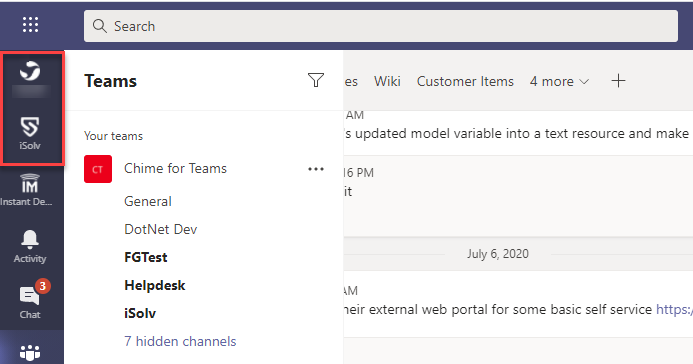
- New Icon Option to Display on Left Side of MS Teams Navigation UI:
- New option in Queue Settings/Advanced to add in MS Teams left side chat icon (3)
- New feature to add Chime Tabs to MS Teams Bot UI (5)
- Toggle added to Queue Settings to optionally include tabs to Application Package
- Files uploaded and screenshots sent during a chat session with a Virtual Agent are now accessible (eg. pushing screenshots to service tickets)
- Invited Agents will now raise event with Virtual Agent
- Fixed an issue where Adaptive Card action buttons (like the connect-to-agent button) inside the guest external bot text resource does not always work
- Released a beta version of our Chime reporting API Extraction Utility


Chime for Microsoft Teams
Releases:
- v3.0.546 (December 14, 2020)
- v3.0.555 (December 16, 2020)
- Check out our new wiki where we will be adding extended Release Notes write-ups
Details:
- Added a new Reporting API key system for programmatically downloading reports and administrative changes
- Added in a new Virtual Agent type for when the agent is connected to a chat
- New queue level event Agent_Connected exposed to the virtual agent implementation – so virtual agent can create ticket when an agent is connected
- Agent context window can now add additional tabs based on a message from a virtual agent (in order to attach an incident URL to the agent’s context window)
- Chime can now add context window tabs when messages from Virtual Agent include "ADDTAB"
- Updated default text resources with a new set of good looking adaptive card designs
- Structure to capture information on when an agent enabled\disabled and provide reporting UI
- Report to display agent\disabled audit report (who enabled or disabled an agent and when) - Agents Enabled/Disabled in Queue
- Modified the QueueUnavailable message to only send when queue is unavailable, it no longer follows up with the TimedOut message


Chime for Microsoft Teams
Releases:
- v3.0.537 (December 2, 2020)
- Check out our new wiki where we will be adding extended Release Notes write-ups
Details:
- Added indicator on the current active web client menu (4)
- Added Bot Framework chat bot Inactivity Timeout Actions. When a Bot Framework chat bot conversation times out Managers can choose for it to either Route, Deflect, or Transfer to Queue
- Charting adjustments to better account for daylight savings time
- Created a new Queue level chart: Text Analytics > Timed Out Sessions
- Added new settings in Admin > Theming to choose the website, privacy and terms of use for the Bot Framework bot manifest
- Added in new commands to end chat sessions ("/end", "\end", "end", and "end chat")
- Chime now send the System Offline text resource when we guests try routing into a queue that is inactive


Chime for Microsoft Teams
Releases:
- v3.0.531 (November 12, 2020)
- Check out our new wiki where we will be adding extended Release Notes write-ups
Details:
- Redesigned the navigation menu. Web client menu used to be placed under a drop-down button. On the latest build, it has been moved into the web client header so that it is more accessible and not hidden. This update should help guests to have an easier way moving from one page to another (4)
- Removed end chat button. The removal of the end chat button is part of the navigation redesign. Other ways to end a chat on the guest web client would be to close the web client window, send /end message, or click an end chat button configured on Adaptive Cards
- Redesigned Agent context window standard reply ui
- Updated Agent context window metadata ui
- Added Azure QnA Maker search functionality into Agent context window (2)
- Updated Guest web client hostconfig in order to provide skinning and UI options for Adaptive Card buttons. This update changes the layout of Adpative Cards rendered in the guest web client. This does not change adaptive card behavior. The updated hostConfig allows Adaptive Cards buttons to be rendered inline, instead of stacked on top of each other (full width.)
- Fixed home dashboard Azure QnA Maker search feature error handling (2)
- Improved handling of special characters and long queue names when generating Microsoft Teams App manifest packages
- Cases of the interview inactivity timeout action are now prevented from attempting to route chats after they have been transferred to another queue
- Chime now forces garbage collection before deleting log files to release file handles held open by Log4Net logging library. Depending on Log4Net and garbage collection, it may take up to 5 days for some logs to be removed from the system
- Added improved error handling for Azure QnA instances assigned to a queue which are inoperative
- Better display of AdaptiveCard validation errors in the Interview card preview
- Added support for case-insensitive handling of user metadata passed to a Chime queue from an external Bot Framework bot or app via the activity.channelData message field
- For more information on passing User Metadata from a Bot Framework chat bot to the Chime Queue when starting a session take a look at our Wiki article here for more information


Chime for Microsoft Teams
Releases:
- v3.0.510 (October 29, 2020)
Details:
- Fixes for Adaptive Card serialization issue when cards had elements with ids
- Added new UI warnings when alerting settings are not properly configured
- Added virtual agent API methods for sending Adaptive Cards
- Fixes for issue where interview Adaptive Cards with inputs and only one option would not submit properly
- Added web client launcher button in queue settings
- Added chat transcript tab into agent web client
- Updates for accessing custom seeker metadata in interview and text resource Adaptive Cards more easily
- Fixed an issue where seeker sends a screenshot while routing to an agent, and the JSON of the file attachment is appended to their question
- Handling for deleting log files when an external process is holding them open
- Updated web client navigation
- Added Azure QnA Maker search feature into web client
- Added new web client settings to show or hide Azure QnA Maker search feature


Chime for Microsoft Teams
Releases:
- v3.0.497 (October 15, 2020)
Details:
- Reports related to Bot Framework chat bot performance and deflection have been split out into a new category: Chat Bot Statistics and Metrics
- Added functionality for web client to pass custom seeker metadata
- Added the ability to step seeker and agent into a voice/video/screenshare online meeting
- Fixes for CSV exports of sentiment analysis reports
- Added visibility into the state of presence tracking operations in the Admin/Health section
- Fix for which prevented Azure Translation API Key from being persisted properly
- Updates to support AdaptiveCard 1.2 schema elements in text resource and standard reply Adaptive Cards
- Fixes for discrepancies between queue dashboard Desk agents and Trending Summary counts of available agents
- Fix to prevent presence of agents from toggling to Unknown when Graph API permissions for querying Microsoft Teams presence information are not granted
- Changed the color of the interview tree button from clear to blue to make it more visible


Chime for Microsoft Teams
Releases:
- v3.0.476 (September 17, 2020)
Details:
- Added the option to play a sound when the Agent chat notification modal opens
- Chime now records when a Bot Framework bot starts and stops conversations with seekers and whether the Bot Framework bot was able to deflect the chat
- Added additional reports to cover Bot Framework bot statistics under Performance Metrics
- New grid report (Bot Chat Details) showing chat sessions handled with Bot Framework bot, Bot Framework bot interaction duration, did bot handle chat
- New bar chart report (Average Bot Chat Duration Over Time) showing average Bot Framework bot conversation length over time
- New pie chart report (Bot Answered vs Transferred vs Deflected Chats) showing breakdown of chats answered vs deflected vs transferred to other queues
- Chime now filters concurrent chat details only for available agents
- Pre-waiting sessions that are in the middle of a Bot Framework bot/VA/interview are now counted in the Waiting column on the consolidated stats bar chart
- Enabled standard replies to be sent out as translated messages if the Azure Translation feature is enabled
- Added a Azure Translation status to prevent translation when agent and guest are using the same language
- Fixed a scenario where guest submits the post-chat survey Adaptive Cards after the chat has expired, without starting a new chat session
- Added a settings.xml field that can tweak the timeout for the post-chat survey


Chime for Microsoft Teams
Releases:
- v3.0.470 (September 3, 2020)
Details:
- Added more back-end checks to prevent multiple agents from joining a chat session
- Improved incoming session notification modal with an X (close) button
- Improved incoming session notification modal so that it closes five seconds after its session was connected

Chime for Microsoft Teams
Releases:
- v3.0.442 (August 26, 2020)
Details:
- Updated the Pick Chat button on the Agent Dashboard to show up even when agents are being prompted to accept
- Added a label in the routing history to show when the chat started routing to agents (e.g. the "Session Started" label is before Bot Framework bots or interviews or VAs or any other dialogs that might take time)
- Added a label in routing history to show if an agent was invited into a chat session
- Updated routing history to show whether a chat was taken by an agent because they were prompted, or because they picked it directly
- Improved Agent presence polling when routing and back-end optimizations to the accepting chat flow
- Added in a Chat Performance by Interval (Beta) chart into the performance metrics charts
- Fixed Redirect bug for Multi-tenant deployments


Chime for Microsoft Teams
Releases:
- v3.0.427 (August 14, 2020)
Details:
- Improve message (chat) formatting when pasting in text from MS Office documents such as Microsoft Word and Microsoft Excel (Chime will attempt to remove leading and trailing line breaks that might be included in the formatting)
- Uploaded files on the web client now have a button to use rather than markdown
- In chat sessions details, remove the embedded URL that could open a file attachment after the chat conversation has completed
- Improving the way images show up in the web client after the files have been uploaded
- In the case where Chime is communicating with another Bot Framework chat bot, using the Directline API, pass attachment objects as attachments instead of providing a server based URL as text
Chime for Microsoft Teams
Releases:
- v3.0.423 (August 13, 2020)
Details:
- Fixed an bug where plain-text Standard Replies and Manager direct messages would not send
- Added an additional sweep to make sure the uploaded files are cleared out after 24 hours from when they are sent
- Improved how session states are managed
- Cleaned up an issue where websocket errors occur when we keep trying to reconnect
Chime for Microsoft Teams
Releases:
- v3.0.414 (August 6, 2020)
Details:
- Added: All queue reports now include the ability to select a start and end time as part of the date range. This should help with reports for periods of time within a day where metrics such as ASA are very important - for example, determining the ASA for a queue from 9:00 AM to 11:00 AM on a particular day
- Added: All system level reports now include the ability to select as start time and end time
- Updated: Update low level presence detection in to resolve presence information in high agent count\volume queues. In order to work around some 0365 graph API throttling limits, presence requests to the 0365 graph API will now be submitted using a batch submission process. One symptom of this issue is when a queue would exceed 100 agents, Chime might not be able to retrieve to the current MS Teams presence for all agents and agent’s presence would render as unknown.


Chime for Microsoft Teams
Releases:
- v3.0.412 (July 27, 2020)
Details:
- Modified the timer that manages the "Searching for agent" periodic wait message to ensure that the wait message is stopped and not sent after the agent is connected
- Chime will now push a Chat Accept notification to the Agent web UI when an agent is invited to a chat by another agent
- Added a resolved sessions report
- Removed the ON label in the Azure Translation button when guest's and agent's languages are the same
- Updated colors and added icons to the accept/decline notification modal
- When inviting an agent in the queue will now check for an available dispatcher slot to start a new conversation with the agent
- Chime now shows invited agents on the details and monitoring panels in addition to the primary agent
- Added an interview choice to route to a queue or a skill tag if the queue isn't available
- Added a new property for the email addresses of the agents who handled the chat
- Added the feature for rendered charts and reports to be exported
Chime for Microsoft Teams
Releases:
- v3.0.393 (July 17, 2020)
Details:
- Added an indicator that an agent is being prompted to accept a chat on the monitor panel and agent dashboard
- Smoothed out the Chime process and Queue processes shut down sequence
- Added an expected wait time over the last hour text resource variable: @Model.ExpectedWaitTimeLastHour
- Auto-translate will not translate if agent and guest are speaking the same language
- Active outages are now sent to the web client guests like we do for the Microsoft Teams client
- Added a badge to webclient's user button when there is an outage


@{
    var expectedWait = "";
    if(@Model.ExpectedWaitTimeLastHour.Minutes < 1 && @Model.ExpectedWaitTimeLastHour.Seconds > 0 ){
        expectedWait = @Model.ExpectedWaitTimeLastHour.Seconds + " Seconds";
    }
    else if(@Model.ExpectedWaitTimeLastHour.Minutes >= 1 || @Model.ExpectedWaitTimeLastHour.Seconds > 0 ){
        expectedWait = @Model.ExpectedWaitTimeLastHour.Minutes + " Minutes " + @Model.ExpectedWaitTimeLastHour.Seconds + " Seconds";
    }
    else{
        expectedWait = "Appologies for the wait, an Agent will be with you soon";
    }
}
{
    "type": "AdaptiveCard",
    "body": [
        {
            "type": "Container",
            "items": [
                {
                    "type": "TextBlock",
                    "text": "Sorry to keep you waiting, your approximate position is @Model.PositionInQueue.",
                    "wrap": true
                },
                {
                    "type": "TextBlock",
                    "text": "Approximate wait time: @expectedWait",
                    "wrap": true
                }
            ]
        }
    ],
    "$schema": "http://adaptivecards.io/schemas/adaptive-card.json",
    "version": "1.0"
}

Chime for Microsoft Teams
Releases:
- v3.0.386 (July 9, 2020)
Details:
- Improved inviting another agent to a chat session and fixed cases where they would fail to connect
- Changed the ordering of events when an expert leaves the chat so that the "agent left" message is sent and the "guest left" message is not
- Chime now pushes a /end message to external Bot Framework chat bot when seekers disconnect
- Added in a Bot Framework bot inactivity timeout feature and controls in Queue Settings
- Chats now end more consistently when the guest closes the web client
- Refined the chat ending sequence so that it works when chats are rolled over or transferred between queues
- Reworked the timer for the periodic wait message to ensure it is stopped when agent is connected

Chime for Microsoft Teams
Releases:
- v3.0.376 (July 2, 2020)
Details:
- Fixed the logic that was checking the post-chat survey resource before sending the Deflected resource
- In hunt routing, Agents are now able to accept or decline a chat in Microsoft Teams by typing in y (to accept) or n (to decline)
- Added a decline button in the accept chat notification modal
- Accept chat notification modal is now hidden in the session details
- Added the option for agents to auto-accept chat sessions. Additional updates coming to this feature in future builds
- Fix Azure Translation status UI
- Added in some checks so once you've been routed or deflected in the interview, we stop processing more interview commands
- Various clean up and minor fixes:
- Added a IsHuntRouting property to the message that prompts agents over signalR when a new chat comes in
- Added virtual-click on the end chat button when closing guest web client
- Update on checking if a queue is on hunt-routing
- Log that the endOfConversation message is sent to external Bot Framework bot
- Clean up some errors that show in logs because of re-entry into DeflectChat method
- Checks against direct-line Attachment property being null
- Clean up some errors that occur after a socket connection error breaks up chat with the Bot Framework bot, and the chat is supposed to start handing off to an agent as the fallback
- Removed "Your session has been ended" message because we have a text resource for when a chat is deflected now
- Cleaned up Virtual Agent logging
- Moved the event processing to another thread to improve text analytics performance


Chime for Microsoft Teams
Releases:
- v3.0.368 (June 25, 2020)
Details:
- Updates to agent presence redundancy and polling notifications
- Chime now allows agents to see the Chat history of chats rolled over into
- Added links between transferred chats in Session Details view
- Added in the session end column to the Basic Details report
- Added in ExpectedWaitTime system variables (Example: Approximate wait time: @Model.ExpectedWaitTime.Minutes Minutes @Model.ExpectedWaitTime.Seconds Seconds)
- To prevent the ExpectedWaitTime from going below zero use this Razor code if the message will repeat multiple times while waiting:
- Added PositionInQueue text resource variable
- Default the Session.StartedRoutingAt variable to the current time for the PositionInQueue text variable if it has not been actually set yet.
- Added new text resource for Deflected chats, separate from the Post-Chat Survey resource
- Added a column for the "StartChatAutomatically" setting that can be used to toggle between auto-start or wait for input web client behavior
- Added a checkbox to admin UI for the Autostart chat setting
- Implemented a toggle for auto-start feature


@{
    var expectedWait = "";
    if(@Model.ExpectedWaitTime.Minutes < 1 && @Model.ExpectedWaitTime.Seconds > 0 ){
        expectedWait = @Model.ExpectedWaitTime.Seconds + " Seconds";
    }
    else if(@Model.ExpectedWaitTime.Minutes > 0 || @Model.ExpectedWaitTime.Seconds > 0 ){
        expectedWait = @Model.ExpectedWaitTime.Minutes + " Minutes " + @Model.ExpectedWaitTime.Seconds + " Seconds";
    }
    else{
        expectedWait = "An expert will be available momentarily";
    }
}
{
    "$schema": "http://adaptivecards.io/schemas/adaptive-card.json",
    "version": "1.0",
    "type": "AdaptiveCard",
    "body": [
        {
            "type": "Container",
            "items": [
                {
                    "type": "TextBlock",
                    "text": "Sorry to keep you waiting your approximate position is @Model.PositionInQueue.",
                    "wrap": true
                },
                {
                    "type": "TextBlock",
                    "text": "Approximate wait time: @expectedWait",
                    "wrap": true
                }
            ]
        }
    ]
}


Chime for Microsoft Teams
Releases:
- v3.0.355 (June 19, 2020)
Details:
- Updated Agent web client to show give a better message when a chat is picked by another agent
- Added a display of the current Agent and Guest languages on the Agent web client when using Azure Translation
- Sorted the language Azure Translation options alphabetically
- Added a system variable to keep track of the last selected interview choice @Model.SelectedOption
- Added the ability to upload a text resource directly from the Queue Settings instead of through Admin
- Added the option to use query strings to pass in seeker data (ex: https://example.server.com/Chime/webclient?id=1&firstname=testFirstName&lastname=testLastName&email=test.email@email.com


Chime for Microsoft Teams
Releases:
- v3.0.347 (June 17, 2020)
Details:
- Updated default language Azure Translation to make it work better
- Improved the agent message notifications
- Updated the message sound to only play if sound is on
- Update to text resources that allows Bot Framework bots to render messages without being wrapped in adaptive cards if the "Styling for Messages that are Sent to Guests" and "External Bot Messages" text resources are emptied
- Added additional logging around active sessions that do not have sessionGuids when picked
- Added channelData that agent web UI backend uses to direct messages to the UI over signalR for the hunt-routing expertConnected prompt
- Added support in the Microsoft Teams client for html, tables and markdown sent from an external Bot Framework bot
Chime for Microsoft Teams
Releases:
- v3.0.342 (June 5, 2020)
Details:
- Fix for virtual agent session state flow
- Fixes for inactivity timeouts waiting for response to post chat survey text resource Adaptive Cards after a chat completes, which could prevent a user from starting a new chat with the queue
- Update queue monitoring panels to indicate when chats are being handled by Interviews
- Updates to handle guest information that is passed to Chime from a custom direct-line client (mobile/portal page) as channelData
- Updates to format of user data that is passed from Chime to external Bot Framework bot.
- Support an external Bot Framework bot indicating that the Chime session that it is handled should be Deflected by sending a “/end” or “/exit” command
- Remove Bot Framework bot name when rendering responses from an external Bot Framework bot that contain suggestedAction items
- Update web client so that it initiates chats automatically
Chime for Microsoft Teams
Releases:
- v3.0.335 (May 29, 2020)
- v3.0.332 (May 27, 2020)
Details:
- Added ability to auto-translate in Agent web client
- The language the guest is writing in now displays in chat messages on the Agent web client
- The initial question is now translated to determine what language the guest is using
- Interview dialogues can now acknowledge the selected options
- Added custom labels for submit button on each interview Adaptive Cards
- Added the option to set one of the choices on an interview Adaptive Cards as the default selection
- Added a timeout timer in the interview
- Bot Framework bots can now use activity.Conversation.ID instead of activity.Sender.ID as sessionGuid for direct-line chat sessions
- Added a Session Comments Report
- Sessions now support mixed plain text and adaptive card messages
- Addd a null-check on the interview timer
Chime for Microsoft Teams
Releases:
- v3.0.322 (May 18, 2020)
Details:
- External Bot Framework bot's credentials are now always populated when invoking it from the interview option
- Added support for the an external Bot Framework bot telling Chime to transfer a chat by sending a "/transfer {queueId}" message, with the queue id of the queue to transfer into
- Agent chat notification panels no longer stack on top of each other
- Browser notification is only invoked once to be less disruptive
- Fix for schedule interval to handle cases where the end time of the schedule interval wraps into the next day
- Chime no longer sends blank text resources if they are set as Adaptive Card rather than plain-text
- Fix for warning about double state transition when the initial welcome message is blank
- Removed the notification tag and track agent notifications manually
- If a queue has a rollover queue, treat it as available for the webclient
- If the Bot Framework bot message text resource is blank, send the response from the Bot Framework bot directly
- Chime will now send a conversationUpdate activity to external Bot Framework bot with the additional fields as channelData
- Fix for browser notification repeating
Chime for Microsoft Teams
Releases:
- v3.0.309 (May 5, 2020)
Details:
- Put in UI for picking rollover queue
- Updated rollover so it works the same as transferring from the interview
- Added Admin notifications for if Azure text analytics is turned on but the credentials go bad
- Updated the health monitor API to be more consistent under load
- Added some extra logging when validating a Microsoft Teams dispatcher
- Fixed a case where email transcripts would send before chat sessions were completed
- Chime will now skip the post-chat survey if there isn't one
- The validation state that sends the "Initial Welcome Message" text resource will only block for a response for 60 seconds if the text resource contains an input that the seeker needs to fill out. If it is a plain text message or an Adaptive Cards without inputs, it will just progress onward
- Fixed the confusing attachment message some users were receiving during file transfer
- Added Agent browser notification for waiting sessions
- Added notification icon for Agents
Chime for Microsoft Teams
Releases:
- v3.0.302 (April 29, 2020)
- v3.0.299 (April 28, 2020)
Details:
- Queue name should be shown correctly in the Session Details chat transcript when chats are transferred between queues
- Toggle to disable incoming chat notifications in the Chime web UI
- Toggle to disable incoming chat notifications in the Chime web UI
- Toggle to disable incoming chat notifications in the Chime web UI
- Improvements to picking chats through the agent web interface, where multiple agents are trying to accept the same chat request.
- Improvements to integration with external Bot Framework bots
- Adding support for handling “suggestedAction” input hints provided by external Bot Framework bot
- Add additional data payload to messages sent by Chime to the external Bot Framework bot providing the end-user’s email address and the Bot Framework channel ID which the initial request used.
- Performance improvements to management of web interface push notifications alerting agents to incoming chat requests.
- Added a fix for the overflow on the agent picker UI
- Queues will now signal why they are failing to start before terminating
- Fix bad request page (rework the authentication middleware options for the issues with too-large cookies)
Chime for Microsoft Teams
Releases:
- v3.0.293 (April 16, 2020)
Details:
- Picking a chat from the web ui when you've already been prompted to accept it in Microsoft Teams by the Hunt routing works now
- Referrer url is now clickable
- Option to choose whether to end or not to end session when closing agent web client
- Fixed issue where Agents had empty chat notifications
- Added the option to clear seeker question at the end of a chat sesison
- Added the option to hide seeker photo in session details
- Variable substitution into adaptive card JSON text resources is now properly escaped if they contain quotes and such
- Replaced Agent web chat spinner with loading status updates
- Bot Framework bot can now show up before or after the welcome message
Chime for Microsoft Teams
Releases:
- v3.0.259 (March 26, 2020)
Details:
-
Queue Updates:
- Added new queue level routing feature ‘Interview’ to provide a decision tree at the queue level
- If interview is added to a queue, the interview will be invoked after the welcome message
- Interview nodes may include action items such as
- Route to Queue
- Route to Tag
- Start Over
- Go Back
- Go to Dialog
- Go to Bot
- Deflect Chat
- Added: Visual representation of interview
- Added: Import and export interviews
- Added: Interviews support Adaptive Cards at the node level
- Added: Adaptive cards may display, and store, Chime session level variables
- Added: Adaptive cards may use specific Chime IDs to render and store session values
- Added: Adaptive card help panel to show model properties supported by Chime
- Added: Queue level text resources may now be exported – including the adaptive card definitions
- Added: Features on the queue UI to assist deploying the queue against a tenant
- Download Teams App Package
- Install Teams App Package
- Updated Queue dashboard monitoring panel now uses real time notification service via SignalR service
- Updated Monitoring panel has cosmetic updates
- Updated some of the items for text resources and Razor syntax
- Render text resources as Adaptive Cards
- Design and create Adaptive Cards using Adaptive Cards editor
- Updated: Virtual Agent tab now renamed Integration
- Updated Cognitive Services tab now renamed Cognitive
- Updated: Added real time notifications to agent dashboard using SignalR
- Updated: Rework agent dashboard to help with UI real estate for agents
- Answer incoming chats using new agent web client
- Added language Azure Translation option to the agent web client UI
- Get MS Teams notification for incoming chats
- Reply to inbound chat requests using MS Teams client or agent UI
- Added SSL Certificate status
- Added Bot Framework Traffic status
- Added Azure Translation Key information in order to support agent side language translation
- Register external Bot Framework instances (for DirectLine API transfer)
- Queue Dispatchers available for inbound Bot Framework Direct Line access
Agents UI and Experience:
Health Monitor:
Admin:
Chime for Microsoft Teams
Releases:
- v3.0.216 (December 9, 2019)
Details:
- Real-time updates for the queue and agent monitor panels
- Support Monaco text editor component on IE 11
- UI for agents to set their presence through Chime.
- Hunt routing option (as in Chime for Lync) where agents are prompted directly to accept chats, rather than picking from the notification channel
- Integration with the beta version of the Microsoft Graph presence API for retrieving user's Teams presence.
- Closing the guest web client should end chat sessions correctly.
Chime for Microsoft Teams
Releases:
- v3.0.194 (November 6, 2019)
Details:
- Added Text resources for wrapping agent and seeker messages
- Updated webclient settings in Chime Admin area
- Fix for Agent Monitor API showing queues an agent is deleted from
- Added end chat button on webclient header
- Update privacy policy link for queue Teams app manifests
- Show Bot Framework ServiceUrls on Health Monitor page
- Improvements to handling screenshots and file attachments that are compressed with gzip
- Fix for date intervals for charts spanning multiple months
Chime for Microsoft Teams
Releases:
- v3.0.185 (October 22, 2019)
Details:
- Ability to invite another agent into a chat with a user, using either Teams or the Agent Web UI
- Support for emoticons and file attachments in chats between the user, agent, and queue dispatcher
- Support for emoticons
- Support for screenshots pasted into the chat
- Support for files uploaded through the Teams client or web clients
- Fix for an issue where it was possible to start a queue without a Teams notification channel defined
- Fix for an issue where chats would not time out after the amount of time configured in the queue settings
- Updates to the web client
- First implementation of optional web based UI for agents – which includes the ability for agents to have multiple chats in different windows
Chime for Microsoft Teams
Releases:
- v3.0.178 (October 3, 2019)
Details:
- Updated set of default queue text resources, including Adaptive Cards
- No delay before routing waiting for further question details If the "Initial Welcome Message" text resource is blank
- Option to automatically install and deploy Teams App packages for a queue (With appropriate Graph API permissions)
Chime for Microsoft Teams
Releases:
- v3.0.174 (September 25, 2019)
Details:
- Web-based agent UI improvements
- Attachment handling for web-based agent UI
- Guest web client refinements
- First-cut of basic alerting functionality
- Added settings for configuring Bot Framework API endpoints per queue
- Installation Wizard fixes
- Updates to Reporting UI
- Updates to the Admin health status page and automatic health monitoring
- Updates to Teams app bot packages installed for the Teams client, to use queue branding images and include additional details
Chime for Microsoft Teams
Releases:
- v1.0.152 (August 12, 2019)
Details:
- Chime now adds users that are in a queue to the corresponding Team in Microsoft Teams via the Graph API (if Chime is granted the Graph API Group.ReadWrite.All permission)
- Added per-message sentiment analysis using Azure Text Analytics
- Refinements and drilldown details for Text Analytics reports
- New web-based chat interface for agents handling chats
- Optimizations for Graph API user and team lookups
- Improved security for validating authenticity of incoming message activity from Microsoft Bot Framework
- Included options to import/export text resources for a queue.
Chime for Microsoft Teams
Releases:
- v1.0.136 (July 18, 2019)
Details:
- Added in the ability to display Adaptive Cards in chat conversations
- Included an adaptive card designer in Text Resources with the ability to launch from the text editor
- Added the Razor templating engine to create Text Resources with dynamic fields
- Including a new feature for sentiment analysis on chat conversations
- New Charts and Metrics included for the sentiment of chat sessions
- Created an interview system for Guests to allow the option to route to any queue from one endpoint
- Adding in the ability to use Bot Framework bot on chat sessions similar to Virtual Agents